
Is Multistreaming Worth It in 2026? Single Platform vs Multistreaming


The short answer
For most growing creators in 2026, multistreaming is worth testing, but not worth doing blindly. Going live on two or three platforms at once gives each stream more chances to be discovered, and with a cloud relay it costs you very little extra upload. It also splits your chat, adds moderation work and comes with platform rules you have to follow. Whether it pays off depends on where your viewers already are, how much interaction matters to your format, and whether any contract or platform rule limits you.
This post is opinion backed by checkable facts: the rules come from the platforms' own help pages and the product details from our pricing and features pages. We sell a multistreaming service, so we have an obvious interest. We have tried to be fair about when a single platform is the better choice. If you want the basics first, read what is multistreaming.
What is different about multistreaming in 2026
Three things make the question more interesting than it was a few years ago.
- Twitch publishes simulcasting rules. Twitch has a Simulcasting Guidelines FAQ and a simulcasting section in its Terms of Service. They allow streaming the same content elsewhere under conditions, for example that the Twitch experience is no worse than on other services and that you do not show chat merged from other platforms on your Twitch stream. Read them yourself before you start; our simulcasting guide summarises them with the sources.
- Short-form and vertical platforms run live too. TikTok LIVE, YouTube and Instagram all compete for live viewers, and many creators now have followers spread across several apps rather than one.
- The tooling is cheaper and lighter. Cloud relays take one stream from OBS Studio or another encoder and deliver it to each platform, so your computer and connection only handle one upload. Multichat tools gather the separate chats into one window so you can answer everyone.
None of this makes multistreaming automatically right. It does mean the old objections, such as "my PC cannot handle it" or "Twitch forbids it", deserve a fresh look rather than a reflex.
When multistreaming is worth it
From what creators and teams tell us, these are the situations where going live in several places most often pays off:
- You do not know yet where your audience is. Early on, every platform is a guess. Streaming to two at once lets each platform's own analytics show you where people find you, instead of betting months on one.
- Your followers are already spread out. If you have a YouTube channel, a TikTok following and a Facebook Page, a live stream on only one of them ignores the people who follow you on the others.
- Your stream is an event. Launches, matches, services, classes and town halls are about reach. Viewers want to watch where they already are, and nobody expects one shared chat. See our use cases for examples.
- Your content works without constant chat. Talks, music, tutorials and live shows hold attention on their own, so a split chat costs you little.
- You want more out of each hour. If you can only stream a few hours a week, publishing the same hours in more places is the cheapest way to get more out of them.
When one platform is the better choice
Multistreaming is not free of trade-offs. A single platform is often the better choice when:
- Community is the product. If your streams are built on a busy chat, in-jokes and regulars, spreading ten viewers across three apps can make each room feel quiet. One lively room usually beats three empty ones.
- You rely on one platform's features. Raids, channel points, platform-specific monetisation or programmes you belong to may push you to concentrate where they work best.
- You signed something. Sponsorships, partner programmes and platform deals can carry exclusivity terms. Check your own agreements; we cannot tell you what they say.
- You cannot moderate several chats. Every platform keeps its own chat and moderation tools. Without moderators, more destinations can mean more unanswered questions and more spam.
- The formats do not match. A landscape gaming stream and a vertical TikTok LIVE are different products. Sending one to both can serve neither well.
If you stream to Twitch, its rules are a practical limit too: do not tell your Twitch viewers to watch somewhere else, and do not put a merged chat from other platforms on your Twitch stream. You can still read every chat privately in a multichat window; our multichat page explains the difference.
Single platform vs multistreaming for growing creators
If you are deciding right now, this table is a fair starting point:
| Your situation | Lean towards | Why |
|---|---|---|
| You are just starting and nobody watches live yet | Multistreaming, on 2 platforms | You do not know yet where your audience is; two platforms is a cheap test and fits a free plan |
| Your audience already lives in one place and chats a lot | Single platform | Splitting a small, close-knit chat across apps can make every room feel empty |
| You have a contract, partner programme or sponsor deal | Read the terms first | Some deals and platform rules set conditions on streaming elsewhere; Twitch publishes its own simulcast rules |
| You run events, shows or brand broadcasts | Multistreaming | Reach matters more than one chat, and viewers expect to watch on the platform they already use |
| You stream vertical content for TikTok and landscape for YouTube | Plan it per format | One landscape stream does not automatically suit a vertical-first audience |
| Your upload is slow or shared | A relay, or one platform | Direct multistreaming multiplies upload; a relay keeps it to one stream |
Notice that "just starting" and "established community" point in opposite directions. Multistreaming tends to help most before you know where your audience is and when reach matters more than chat. It helps least once a single community is the reason people show up.
What multistreaming really costs
There are three costs to weigh: upload bandwidth, money and attention.
Upload bandwidth
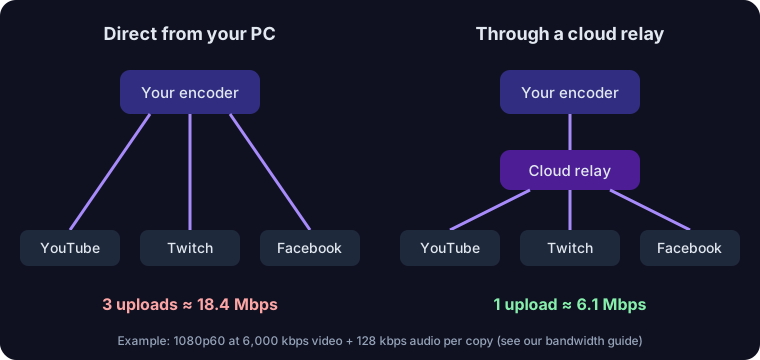
If your encoder sends a separate copy to every platform, your upload multiplies with each destination. A relay receives one stream and makes the copies in the cloud. For three platforms at 1080p60, that is the difference between about 18.4 Mbps and about 6.1 Mbps of upload:
Check your own numbers with the multistream bandwidth calculator and pick a bitrate with the bitrate recommender. YouTube publishes its own encoder recommendations if you want to go higher than 6 Mbps.
Money
You can test multistreaming without paying. Our Starter plan is $0 per month for up to 2 channels at once, 20 streaming hours a month at 720p and 30 fps. Creator is $19 per month billed monthly (or $15 per month billed annually) for up to 5 channels, 50 hours and 1080p60. Higher plans and full details are on the pricing page. If you would rather compare providers first, our comparison of multistreaming platforms lists free plans and prices from each provider's own pages.
Attention
This is the cost most people underestimate. Each extra platform is another chat to read, another set of moderators to brief, another title and thumbnail to set. A multichat window helps you read and reply in one place; it does not remove the need to look after each community.
A 30-day way to find out for yourself
The honest answer to "is it worth it for me?" is in your own analytics, not in anyone's blog post. A simple test:
- Pick one extra platform, not five. Choose the one where you already have some followers.
- Keep everything else the same: schedule, length, format and title style, so the only change is the extra destination.
- Write down a baseline from your main platform's analytics before you start: average live viewers, chat messages, new followers per stream.
- Stream through a relay so the test does not hurt your stream quality. Our OBS multistreaming guide walks through the settings.
- After four weeks, compare: did the main platform hold steady? Did the second one add viewers, followers or chat you would not have had? Did the extra work feel sustainable?
If the second platform added people and the main one did not drop, keep it and consider a third. If the main platform dropped or the workload was too much, go back to one and revisit the idea later.
Before your first multistream: a checklist
- Read the rules of every platform you will use, especially Twitch's simulcasting guidelines.
- Check any sponsorship or partner agreement for exclusivity terms.
- Get each platform's stream key or connect it to your relay; stream keys by platform shows where each one lives.
- Test your upload and set a bitrate you can hold for the whole stream.
- Set titles and descriptions on each platform so viewers know what they are watching.
- Decide how you will read and moderate each chat before you go live.
- Run a short private test first. The OBS Project's own documentation encourages testing before you go live.
For the full setup on YouTube, Twitch and Facebook, follow how to stream to multiple platforms at once.
Sources
Frequently asked questions

Go live everywhere from one stream
Send one RTMP or SRT stream from OBS, vMix or a hardware encoder and we relay it to YouTube, Twitch, Facebook, Kick, TikTok and custom destinations. The Starter plan is $0 a month with 2 channels and 20 streaming hours.

Ready to stream everywhere?
Bring your live, hosted, and pre-recorded streams into one platform.
